
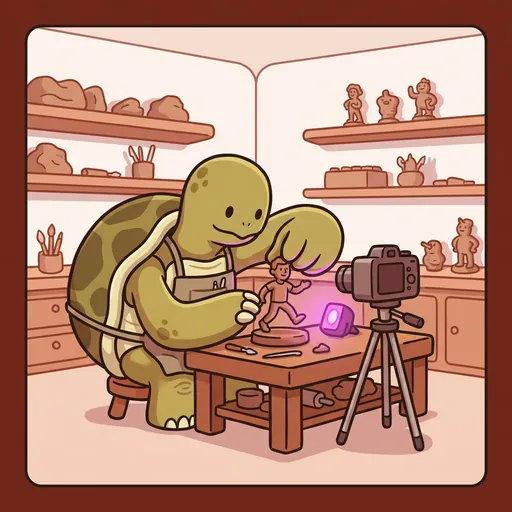
Step
STOP-MOTION — *frame by frame, one decision at a time. patience makes motion.*
Listen along — Step
Loading audio…
Press play to listen along. The line being read lights up as you go.
Show full transcript
Loading transcript…
Chapter 4 — Step and the Patience That Becomes Motion
In the quiet corner of the EffectsForge workshop, a turtle-tween named Step reached out one careful claw and moved a clay figurine’s leg forward by the width of a whisker.
Click. The camera on its tripod took the photo.
Step nudged the leg again — barely, just a hair. Click. Again. Click. On the workbench, the little clay walker never seemed to go anywhere. Its arm was frozen mid-swing. Its foot hung in the air. To anyone glancing over, Step looked like he was doing almost nothing, very slowly.
A girl carrying a phone stopped to watch. She watched a long time. “You’ve been at that for ages,” she finally said, “and it hasn’t even taken a step.”
“It’s taken twelve,” Step said, without looking up. “Watch.”
He tapped the screen, and the twelve still photos played back in a rush. On the little screen, the clay figure walked — a smooth, unhurried stride right across the bench, arm swinging, foot landing, alive.
The girl’s mouth fell open. “It moved! But it was just — it was just standing there!”
“Twelve times it was standing there,” Step said. “Twelve decisions. One second of walking.” He set the figure back at the start and touched its leg again, ready for the next frame. “Your eyes stitch the still pictures together and call it motion. All I do is give them the pictures, one at a time, and wait.”
Step had learned about waiting long before he learned about cameras.
He grew up in the slow-river village, where his family carved wood the old, patient way. His grandfather could spend a whole season on a single panel — one careful cut, then the next, then the next. When Step was small, he hated it. He wanted the carving to be finished, and it never was, and the wanting sat in his chest like a stone.
“I’ve been sanding this same edge all morning,” he told his grandfather once, near tears. “It doesn’t look any different. I feel like I’ve done nothing.”
His grandfather ran a thumb over the edge. “Feel that.”
Step felt it. It was smooth now. Yesterday it had been rough, and he hadn’t even noticed it changing under his own hands.
“Every stroke was too small to see,” his grandfather said gently. “That’s why it feels like nothing. But nothing plus nothing plus nothing, a thousand times, is the whole carving.” He smiled. “Patience isn’t waiting for the work. Patience is the work. They’re the same thing.”
Step didn’t stop wanting things to be finished. But the tight, restless, stone-in-the-chest feeling had a different shape now. When he couldn’t see the change, he learned to trust that it was happening anyway — one too-small-to-see stroke at a time.
He walked to EffectsForge when he was thirteen, because a place that made things move ought to understand the kind of moving that happens too slowly to see.
Render, the mentor who ran the workshop, met him at the door and asked one question. “What is stop-motion?”
Step didn’t explain. He set a lump of clay on the nearest bench and shaped it, in about a minute, into a rough little figure. He aimed a borrowed camera at it on a stack of books so it wouldn’t wobble. He took a photo. Moved the arm a sliver. Took another. Moved it again. After a dozen photos he played them back, and the clay figure lifted its stubby arm in a slow, deliberate wave.
“It waved,” Render said.
“It never waved,” Step said. “It stood still twelve times and let its arm be a little different each time. My hands did the moving. The eyes did the rest.” He patted the stack of books. “The camera can’t move, or the whole world jitters. That’s the only rule I can’t break.”
Render looked at the waving clay figure for a long moment, then at the boy who had made a lump of mud say hello. “You belong here,” he said.
Step’s workshop filled up with kids who wanted to make things move.
One boy came in slumped, holding his phone like it had betrayed him. “I tried to make my toy dinosaur walk,” he said. “It looks terrible. It’s all jerky and jumpy. I did like sixty photos and it’s garbage.” He was ready to quit; Step could see it in his shoulders.
Step knew that slump. He’d carried it in the carving shed.
“Show me,” he said. The boy played it. The dinosaur lurched across the screen in ugly hops. “How far did you move it between photos?”
The boy shrugged. “I dunno. However far.”
“That’s the whole thing,” Step said, not unkindly. He picked up his own clay figure. “Watch my hand.” He moved the leg a tiny, tiny bit. “About the width of a grain of rice. Then photo. Then rice-grain again. Same size, every time.” He let the boy take the next photo, then guided his hand — this much, no more — and let him take another. “The jumps are the jitter. Small and even is smooth.”
They did it together, six frames, and played it back. The dinosaur took one slow, real-looking step.
“It’s not garbage anymore,” the boy whispered.
“Your first one was never garbage,” Step said. “It was your first one. Wallace and Gromit took years and a whole studio, and they were doing this exact trick — clay, a camera that stays put, tiny even moves, patience. You just did the same craft, smaller.” He grinned. “Your second try will be smoother than your first. That’s not a promise. That’s just what happens when you keep going.”
Late in the afternoon, when the workshop had emptied out, the boy came back with a quieter question.
“When you’re in the middle of it,” he said, “and it’s a hundred photos and nothing’s moving yet — how do you not just… give up?”
Step thought about the sanded edge under his grandfather’s thumb.
“You stop trying to see the whole thing,” he said. “You just make the next frame the best you can, then the next one. Each one’s too small to matter. But too-small-to-matter, done a thousand times, is a whole world walking around.” He picked up the clay figure, mid-stride, patient in his palm. “The slow part isn’t the boring part. The slow part is where the aliveness gets made — one decision, then another, then another, until suddenly it breathes.”
The boy nodded, and Step watched the tightness lift out of his shoulders — the same restless stone he’d once carried, finally set down.
He didn’t say the rest out loud, but he felt it, warm and steady all the way through his shell: the parts that feel like nothing are almost always the parts doing the real work. You just have to stay soft enough to keep going, and trust your hands while your eyes catch up.
The EffectsForge ensemble
Step is part of EffectsForge's distributed-narrative cast. Each character embodies a different curricular primitive; together they teach the full subject.